Common setup
Windows prep that is the same for every product. Do it once per PC. Not every product needs every step, but most need at least some of them.
BIOS settings such as virtualization, Secure Boot and TPM are different for each product, so they are listed on the product's own page.
Before you start
- Optional: create a Windows restore point first, so you can undo these changes later. How?
- Turn off any antivirus you have installed.
- Uninstall Riot Vanguard and FACEIT/ESEA. How?
- Install WinRar. You will use it to extract the loader and the other downloads.
Turn off Windows Defender
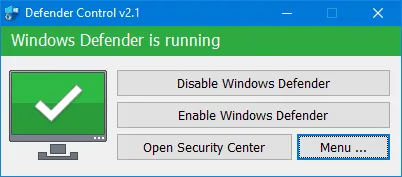
The easiest way is dControl.
- Download dControl.
- Unzip it (right-click
Defender Control.zip, extract). If it asks for a password, it issordum. - Open
dControl.exe. - Click "Disable Windows Defender".
Install Visual C Runtimes
- Download Visual C Runtimes.
- Unzip to a new folder (right-click the zip, WinRar, Extract To...).
- Run
install_allas administrator. - Press Yes on every prompt. Each install can take a few minutes.
Install DirectX
- Download DirectX (
dxwebsetup.exe). - Run
dxwebsetup.exe. - Untick "Install Bing Bar" so it does not cause errors.
Good to know
Can I get banned? Yes. There is always a risk of losing your account, even when a product is listed as undetected. Keep your stats low, play legit when you are being spectated, and use "legit" settings. Undetected does not mean unbannable: how you play matters as much as the product.
What is a spoofer and should I use one? A spoofer swaps your PC's hardware identifiers for temporary fake ones, so your real hardware does not get banned. If a ban happens you re-spoof and keep playing. Using one at all times is recommended.
When does my time start? Not when you buy. Your license starts counting down when you enter the key into the loader. It keeps running while you are not playing. To extend it, buy another license.
Still stuck? Contact support.